8th September 2018,
DSLR camera.
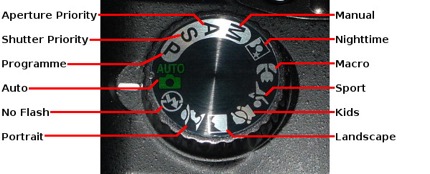
On top of the DSLR camera, there is a mode dial which enables me to change the camera modes. There is a wide range of different modes that I can choose, which allows me to take the best photos I want to receive.
DSLR Camera settings
Auto- auto mode leaves all decision making to the camera, you just point and shoot.
P- the automatic mode you start to take more control if the camera and begin to have more input into how your photographs turn out. Although the camera sets the aperture and shutter speed, this can be adjusted but changing the ISO.
Av- aperture priority mode is the longest- standing shooting mode, Aperture priority works in the same way as shutter priority, although you are able to choose the aperture setting and the camera selects a shutter speed that it calculates which will give the correct exposure.
Tv- shutter priority mode allows you to pick your preferred shutter speed and the camera selects the aperture that will provide you with the best overall exposure. shutter priority is best suited to subjects that need a specific shutter speed to freeze fast-moving sports or wildlife subjects.
M- manual mode (I am able to set both shutter speed and aperture) the camera will give a guide towards the exposure that is most suitable.
Scene modes:
Flower- macro mode (close up) the camera will set a small aperture in an attempt to overcome the issues with focusing.
Portrait- In portrait mode, the camera will set a wide aperture. the colour and contrasts are both set to produce natural-looking skin tones, in low-light situations the built-in flash will fire automatically.
Landscape- landscape mode, allows the camera to set a small aperture for a large depth of field. the colours are intensified slightly to add vibrancy to the outdoor shots.
sports mode- sports mode is the freezing action, the camera will select a fast shutter speed for a split-second exposed time, which has a wide aperture setting. sports mode sets the focus to continuous mode so it can follow fast-moving subjects around a frame.
Child- with most cameras the difference between child mode and portrait mode is very small. child mode uses the same wide aperture approach as Portrait mode which blurs the background, it aims to use a faster shutter speed to keep up with the child.

For example, when using a shallow depth of field for portraits you can use a wide aperture which is guaranteed to give the image maximum impact. The reason it works well so that it can be used to focus the viewer’s action onto the subject. To be able to achieve this the camera settings that I would use would be aperture priority, multi-area, aperture setting, shutter speed and the ISO setting. These are the settings I use when trying to achieve shallow depth of field.
 Level 3 Vocational Photography Meagan Jones